Referring Doctor Wise Sale Report
Overview
This report shows how much of your pharmacy retail sales came from each referring doctor. It deducts cancellations, refunds and returns, and it includes sales that have no referring doctor, so the grand total matches your total retail sales.
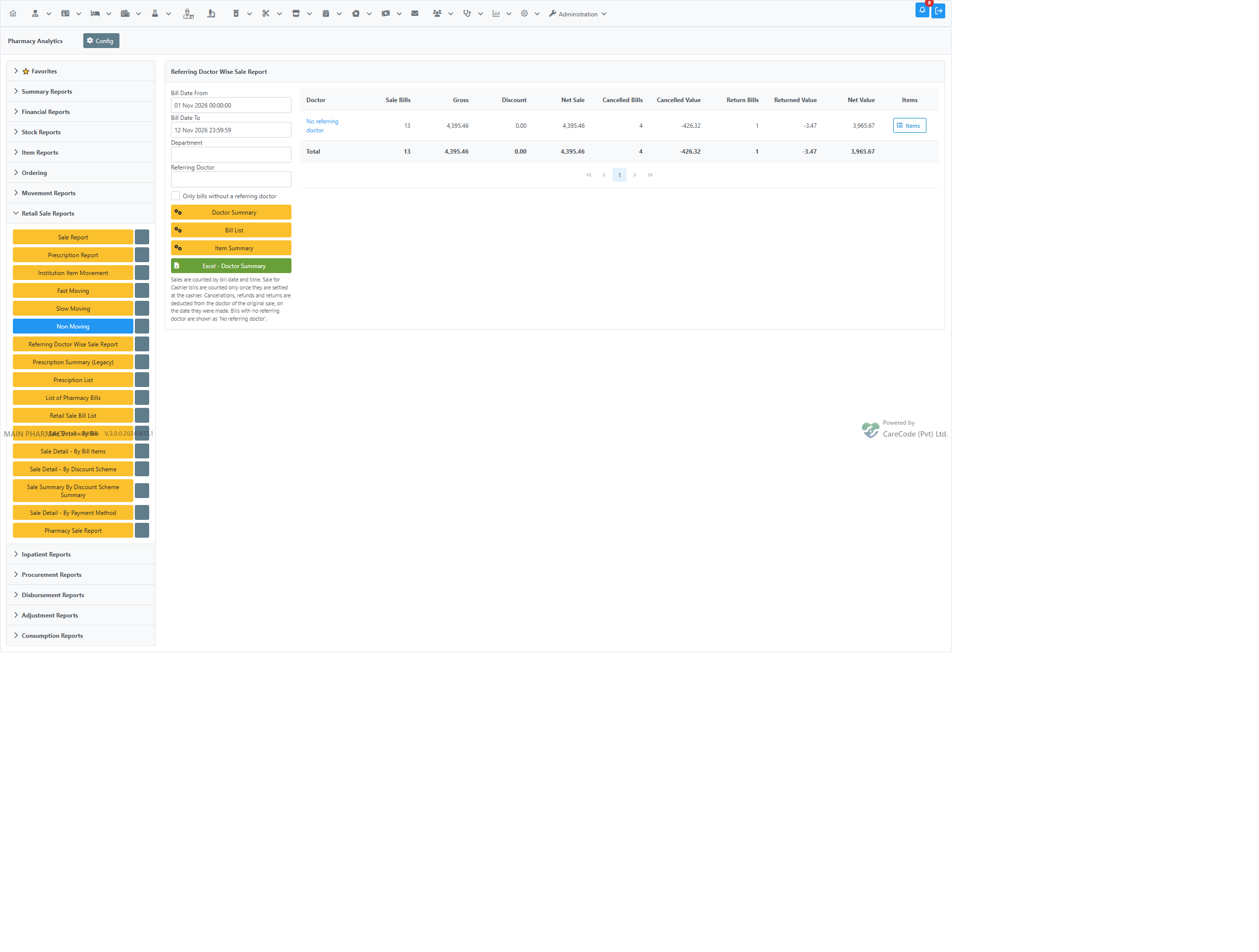
Doctor Summary: one row per referring doctor, with a Total row; bills without a doctor are grouped as No referring doctor.
When to Use
- To see the sales value linked to each referring doctor for a period.
- To check which items a doctor's prescriptions lead to.
- To reconcile doctor-wise figures with total retail sales.
- To find retail bills where no referring doctor was entered.
How to Use
Menu path: Pharmacy → Pharmacy Analytics → Retail Sale Reports → Referring Doctor Wise Sale Report
You can also click the star beside the button to add it to your Favorites tab.
- Set Bill Date From and Bill Date To. Both include the time. By default they run from the start of this month to the end of today.
- Optionally pick a Department.
- Optionally pick a Referring Doctor.
- Optionally tick Only bills without a referring doctor to list only sales where no doctor was entered.
- Click one of the three views.
Doctor Summary
Click Doctor Summary. You get one row per doctor with these columns:
| Column | Meaning |
|---|---|
| Doctor | Referring doctor. Bills with no doctor appear as "No referring doctor". |
| Sale Bills | Number of sale bills. |
| Gross | Sales before discount. |
| Discount | Discount given. |
| Net Sale | Sales after discount. |
| Cancelled Bills / Cancelled Value | Number and value of cancelled bills. |
| Return Bills / Returned Value | Number and value of refunds and returns. |
| Net Value | Net Sale less cancellations and returns. |
A Total row at the bottom adds up every doctor.
- Click a doctor's name to list that doctor's bills.
- Click the Items button on a row to list that doctor's items.
Bill List
Click Bill List. Each bill is shown with Bill No, Date/Time, Type, Bill Type, Doctor, Patient, Payment Method, Department, Gross, Discount and Net, with totals at the bottom.
Item Summary
Click Item Summary. For each doctor and item you see the Quantity and Net Value, with totals at the bottom.
Excel
After a view is shown, use Excel - Doctor Summary, Excel - Bill List or Excel - Item Summary to download it.
How the Figures Are Worked Out
- Sales are counted by bill date and time.
- Both Retail Sale and Retail Sale for Cashier bills are included.
- A Sale for Cashier bill counts only once it has been settled at the cashier.
- A cancellation, refund or return is deducted from the doctor of the original sale, on the date the cancellation, refund or return was made (not the date of the original sale).
- Bills with no referring doctor are grouped in a No referring doctor row.
Understanding Messages
- Not Authorized: you do not have the privilege for this report.
- No records found for the selected period and filters: nothing matched. Widen the dates or clear the filters.
Best Practices
- Run the report for complete periods when you compare it with other sales reports.
- Check the No referring doctor row regularly. Ask staff to enter the doctor at the sale.
- Use Bill List to check any figure that looks unusual.
Troubleshooting
| Problem | What to do |
|---|---|
| The button is missing in Retail Sale Reports | Ask an administrator to check the privilege and option under Configuration below. |
| A doctor's net value is lower than expected | Cancellations and returns in the period are deducted from the original sale's doctor, even if the sale was earlier. |
| A recent Sale for Cashier bill is missing | It is counted only after the cashier settles it. |
Configuration (Admin)
- Privilege: the user needs Prescription Summary under Pharmacy Analytics, Retail Sale Reports in the user privileges.
- Application option:
Pharmacy Analytics - Show Referring Doctor Wise Sale Report(on by default) shows the button. - Application option:
Referring Doctor is required in Pharmacy Retail Sale. When it is off, the Referring Doctor field on the sale pages is optional. When it is on, staff must enter one, so fewer bills fall under "No referring doctor".
FAQ
Why is there a "No referring doctor" row? So the total equals total retail sales, even when the doctor was left blank.
How does this differ from Prescription Summary (Legacy)? The legacy report counts by date only, leaves out bills without a referring doctor and does not deduct refunds or returns. Use this report for reconciled figures.