Inpatient Pharmacy Requests
The Pharmacy Requests page lists every medicine request a ward has sent to the pharmacy, with how much of each request has been issued, how much has come back, and what the patient is being charged for it.
There are two versions of the page:
| Page | How to open it | Shows |
|---|---|---|
| Pharmacy Requests for one patient | Inward → Search → Admissions → search the BHT → Inpatient Dashboard → Pharmacy Requests | Every request raised for that admission |
| Pharmacy Requests for a ward | Inward → Nursing WorkBench → Pharmacy Requests | Requests raised from the department you are logged in to, for all patients, with filters for status (Issued, Partially Issued, Not Issued, Cancelled), pharmacy, patient/BHT and date |
Columns
| Column | Meaning |
|---|---|
| Bill No | The request number |
| Ward | The ward the request was raised from (patient's page only; the ward page shows BHT No and Patient instead) |
| Requested Department | The pharmacy the request was sent to — the department chosen on the request screen |
| Requested At / Requested By | When and by whom the request was made |
| Status | See below |
| Issued | Total value of the medicines issued against the request. Cancelled issues are not counted |
| Returned | Value of those medicines later returned — pharmacy refunds from the interim bill, and ward returns to pharmacy |
| Net | Issued − Returned: what the patient is charged for this request |
Total Net (Issued − Returned) at the bottom adds up the Net column for all requests that are not cancelled.
Status
| Status | Meaning |
|---|---|
| Not Issued | Nothing has been issued yet, or every issue was cancelled |
| Partially Issued | Some requested medicines (or part of a quantity) have been issued, but not all |
| Issued | Every requested medicine has been issued in full |
| Cancelled | The request itself was cancelled |
Returns do not change the status: a request that was issued in full stays Issued after the patient returns medicines. The returned value shows in the Returned column and reduces Net.
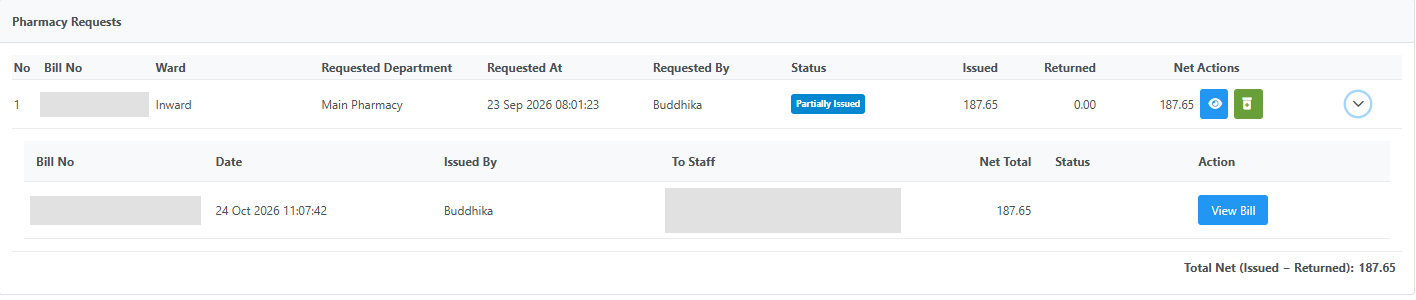
One of two requested medicines was issued: the request shows Partially Issued, and its issued value is counted in Net and in the total.
Issued bills for a request
Click the arrow at the end of a row to see the issue bills made against that request. A cancelled issue bill is tagged Cancelled and its value is struck through.
Cancelling an issue reopens the request
When pharmacy cancels an issue made against a request (Interim Bill → Medicine and Consumable Charges → View Issue → To Cancel → Cancel Bill), the cancelled medicines go back to "still to be issued":
- the request's status drops back to Partially Issued or Not Issued,
- the Issue Medicines button appears again, so pharmacy can issue the medicines again,
- the request again counts as pending for Nursing Discharge until it is issued or cancelled.
A return (refund) does not reopen a request.
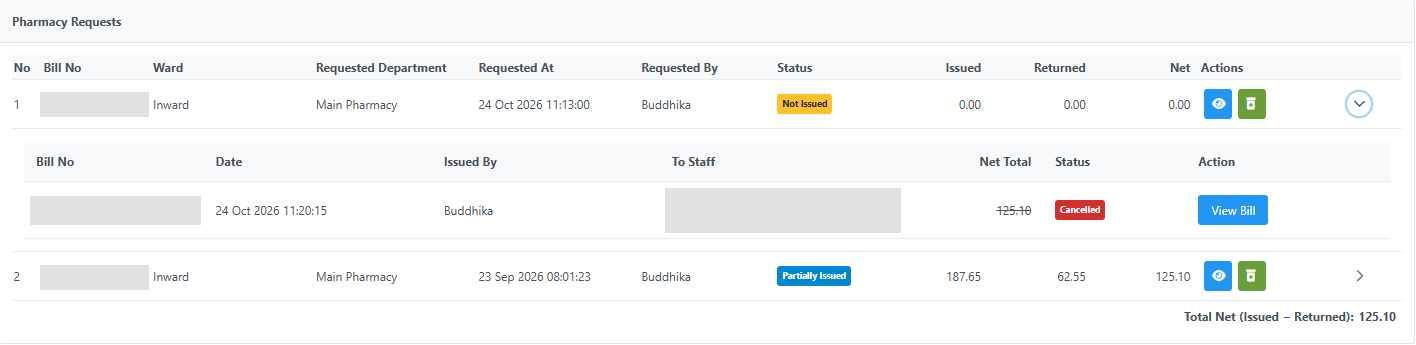
Row 1: its only issue was cancelled, so the request is Not Issued again with Issue Medicines available. Row 2: part of the issue was refunded, so Returned and Net reflect the refund while the status stays the same.
Buttons
- View Request — open the request (reprint, edit or cancel it).
- Issue Medicines — open the issue screen for a request that is not yet fully issued. Requires the
PharmacyBHTIssueAcceptprivilege. A request that was force-completed with Mark as Complete stays completed even if one of its issues is later cancelled. - Refresh, Download (Excel) and Print at the top of the page.