Admission Category Wise Admission Report
Lists the inpatient admissions in a date range, grouped by admission category. Each row shows the admission's advance, professional fees, hospital, sponsor and patient amounts, discount, invoice amount and balances. Use it to compare categories, or to check what is still owed on the admissions of one department or sponsor.
Page: Reports → Reports → Inpatient Reports tab → 4. Admission Category Wise Admission
Privilege: Reports Page - 4. Admission Category Wise Admission
Favorite key: admissionCategoryWiseAdmission (star it to also pin it to the ⭐ Favorites tab)
Filters
| Filter | What it does |
|---|---|
| Admission From Date / To Date (required) | Admissions whose admission date falls in this range. |
| Admission Category | One admission category, or All. |
| Discharge From Date / To Date | When both are set, keeps only admissions discharged in this range. |
| Invoice Approved From / To | When both are set, keeps only admissions whose final bill was created in this range. |
| Institution | Admissions made under this institution. |
| Site | Admissions whose department belongs to this site. |
| Department | Admissions made under this department. |
| Consultant | Admissions with this referring consultant. |
| Sponsor | Admissions with this credit company. |
| Payment | Admissions with this payment method. |
| Admission Status | For example, admitted but not discharged, or discharged but final bill not completed. |
Click Process to run the report. To Print, Download Excel and PDF output the same results.
Institution, Site and Department
The Department list follows the Institution and Site you choose:
| Institution | Site | Department list shows |
|---|---|---|
| All Institutions | All Sites | Every department |
| Chosen | All Sites | Departments of that institution |
| All Institutions | Chosen | Departments of that site |
| Chosen | Chosen | Departments of that institution at that site |
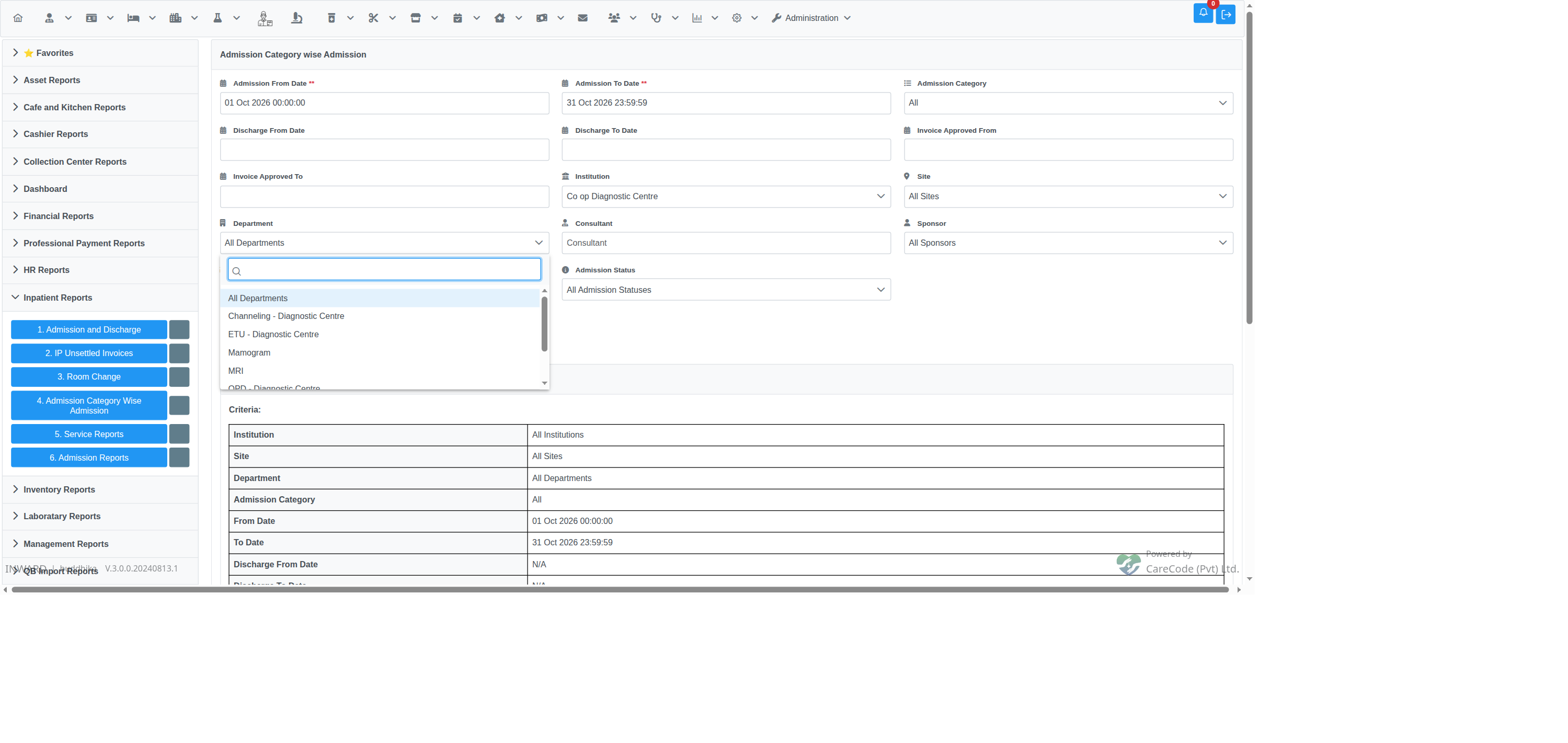
Institution chosen and Site left as All Sites: the Department list shows that institution's departments.
Before issue #24651 was fixed, choosing an Institution with Site left as All Sites usually left the Department list empty. You could not narrow the report to one department of that institution.
Columns
No, BHT, Patient Name, Admission Category, Advance, Professional Fees, Hospital Amount, Sponsor Amount, Patient Amount, Discount, Invoice Amount, Bill Balance, Patient Balance.
Rows are ordered by admission category, then BHT number. Above the table, a Criteria block lists the filters used.