Inpatient — Cancel Admission
Cancelling an admission voids the BHT and removes the patient from the active admission list. This is used when an admission was created in error and no clinical or financial activity has occurred against it.
Entry point: Inpatient → Admissions → Edit Admission Details → (select the admission) → Inpatient Dashboard → Cancel Admission
Controller: BhtEditController.navigateToCancelAdmission()
Privilege: InwardAdmissionCancel
When Cancellation Is Allowed
An admission can only be cancelled if:
- No service bills have been posted against the BHT
- No pharmacy issues have been made to the BHT
- No final bill has been generated
- No deposit payments have been collected
If any of these conditions are not met, the system will block the cancellation and display an appropriate message. Reverse or cancel the dependent transactions first before attempting to cancel the admission.
Automatic admission charges are the exception. Charges billed automatically at admission (see Admin — Inpatient Automatic Admission Charges) do not have to be cancelled by hand first — cancelling the admission reverses them for you.
One of those charge bills can still block the cancellation if it genuinely may not be reversed: it has been checked, it has already been returned, or a doctor payment has been made against it. The message names the bill and the reason. Resolve that first, then cancel the admission.
What Cancellation Does
- Reverses any automatic admission charges with contra-bills, before anything else is touched
- Sets the admission (
PatientEncounter) status to cancelled - Releases the room back to vacancy
- Removes the patient from the room occupancy board
- The BHT number stays on the cancelled admission. Whether the next admission can reuse it depends on the setting below.
The BHT record itself is retained in the database for audit purposes — cancellation does not delete data.
Giving the BHT Number Back to the Sequence
When the application option Return BHT Number of a Cancelled Admission to the Sequence When It Is the Last Number Issued is turned on, cancelling an admission gives its BHT number back, so the next admission of that type receives the same number. The option is off by default. An administrator turns it on under Administration → Manage Institutions → Preferences → Application Options.
This only happens when the cancelled admission holds the last number issued in its series. If a later number has already been given to another patient, the counter is left alone, because moving it back would hand out a number that is already in use.
After you cancel, a message tells you what happened:
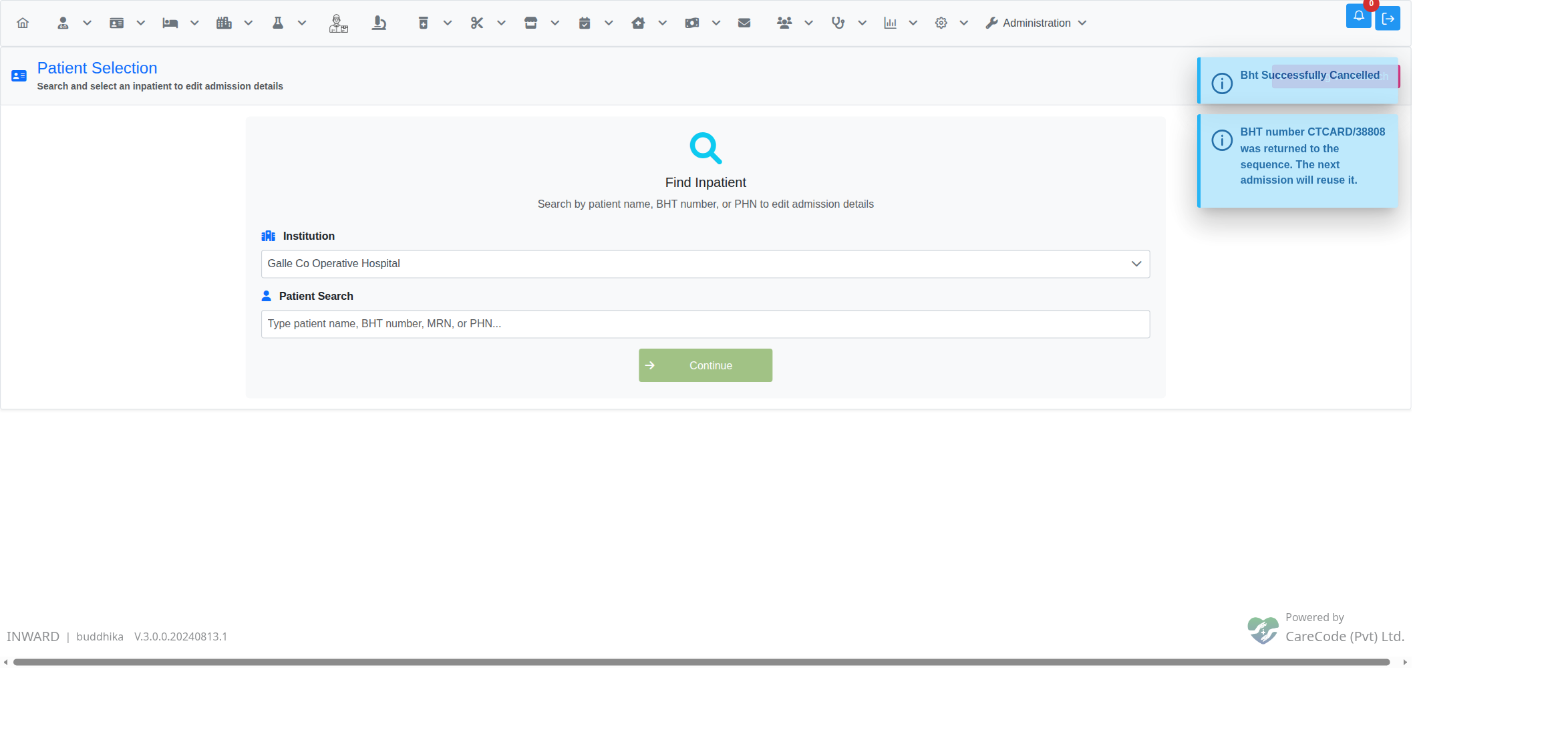
The cancelled admission held the last number issued, so the number was returned and the next admission will reuse it.
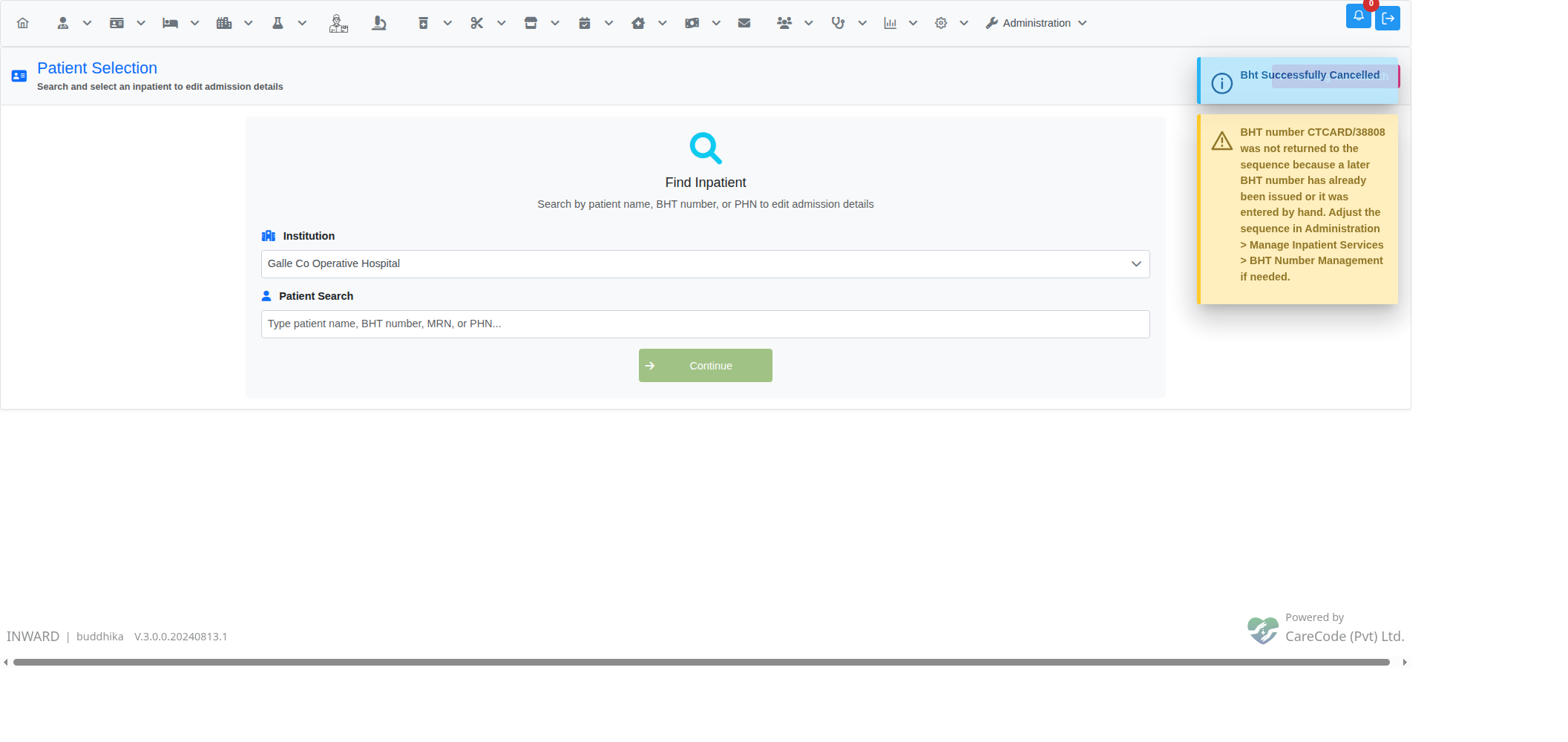
A later number had already been issued, so the counter was left alone. Use BHT Number Management if the sequence still needs adjusting.
A BHT number typed in by hand at admission (when BHT Number can be edited at the time of admission is on) never came from the counter, so it is never returned.
To adjust the sequence yourself, for example after cancelling an admission that was not the latest, use Admin — Inpatient BHT Number Management.
Reason for Cancellation
The system prompts for a reason before completing the cancellation. The reason is recorded in the audit log along with the user's identity and timestamp.
Related Articles
- Inpatient — Edit Admission Details — correct admission fields without cancelling
- Inpatient — Admit a Patient — create a new admission after cancelling an erroneous one
- Inpatient Admission Profile (Dashboard) — central dashboard for the BHT
- Admin — Inpatient Automatic Admission Charges — charges reversed automatically when an admission is cancelled
- Admin — Inpatient BHT Number Management — adjust the BHT sequence by hand